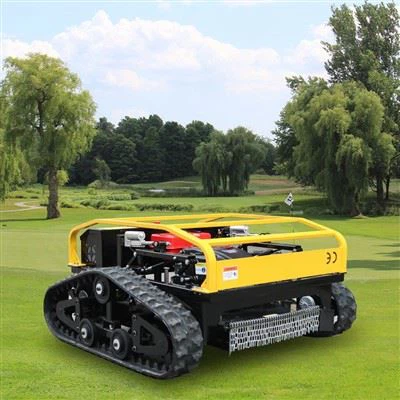
As a supplier of remote mowers, I understand that issues can arise with these advanced pieces of equipment. One common problem that users may encounter is the need to reset their remote mower. In this blog post, I'll walk you through the process of resetting a remote mower, providing a step - by - step guide to help you get your machine back up and running smoothly.
Why Reset a Remote Mower?
Before we dive into the reset process, it's important to understand why you might need to reset your remote mower. There are several reasons for this. First, if the mower is not responding to the remote control commands correctly, a reset can often recalibrate the connection between the mower and the remote. Second, if the mower has experienced a software glitch or an error, a reset can clear the system and restore normal operation. Third, after a power outage or a battery change, resetting the mower can ensure that all settings are properly configured.
Step 1: Safety First
Before attempting to reset your remote mower, make sure to take all necessary safety precautions. Turn off the mower and remove it from the lawn to a safe, flat surface. Disconnect the power source, whether it's a battery or a power cord. This will prevent any accidental starts during the reset process and protect you from potential injuries.
Step 2: Locate the Reset Button
The location of the reset button can vary depending on the model of your remote mower. Most modern remote mowers have a small, recessed reset button on the control panel or the main body of the mower. You may need to use a small tool, like a paperclip or a pen tip, to press the button. Refer to your mower's user manual if you're having trouble finding the reset button.
Step 3: Perform the Reset
Once you've located the reset button, press and hold it for a specific period of time. Usually, you'll need to hold the button for about 5 - 10 seconds. You may see the mower's lights flash or hear a beep, indicating that the reset process has begun. Keep holding the button until the mower's display shows that the reset is complete.
Step 4: Re - Connect the Power Source
After the reset is finished, re - connect the power source. If you're using a battery, make sure it's fully charged and properly installed. If it's a power cord, plug it back into a reliable power outlet.
Step 5: Pair the Remote Control
Once the mower is powered on again, you'll need to pair the remote control with the mower. This process typically involves pressing a pairing button on both the remote and the mower. Follow the instructions in your user manual to complete the pairing. After successful pairing, you should be able to control the mower using the remote.
Step 6: Test the Mower
Before sending the mower back to the lawn, perform a quick test. Move the mower forward, backward, and turn it left and right using the remote control. Check if all the functions, such as the cutting blades and the sensors, are working properly. If everything seems to be in order, you can place the mower back on the lawn and start using it as normal.
Troubleshooting Tips
If you've followed all the steps above and the mower still isn't working correctly after the reset, there could be other underlying issues. Here are some additional troubleshooting tips:
- Check the Remote Batteries: Weak or dead batteries in the remote control can cause communication problems. Replace the batteries with fresh ones and try pairing again.
- Inspect the Antennas: Both the mower and the remote control have antennas. Make sure they are not damaged or blocked. A damaged antenna can prevent the proper transmission of signals.
- Update the Software: Some remote mowers have software that can be updated. Check the manufacturer's website for any available software updates and follow the instructions to install them.
Benefits of Our Remote Mowers
As a supplier, we take pride in offering high - quality Remote Grass Mower. Our remote mowers are equipped with the latest technology, providing you with precise control and efficient lawn - mowing performance. They are designed to be user - friendly, with easy - to - understand controls and intuitive interfaces.
Our Robotic Lawn Mower models offer even more advanced features. They can be programmed to mow your lawn at specific times, and they use intelligent sensors to avoid obstacles and navigate around the lawn. This not only saves you time and effort but also ensures a consistently well - manicured lawn.


Our Remote Control Mower series is known for its durability and reliability. Built with high - quality materials, they can withstand tough outdoor conditions and provide long - lasting service. Whether you have a small residential lawn or a large commercial property, we have a remote mower that suits your needs.
Contact Us for Purchase and Consultation
If you're interested in purchasing a remote mower or have any questions about our products, we encourage you to reach out to us. Our team of experts is ready to assist you with product selection, technical support, and after - sales service. We can provide you with detailed information about the features, specifications, and pricing of our remote mowers. Contact us today to start a conversation about how our remote mowers can transform your lawn - mowing experience.
References
- Manufacturer's user manuals for remote mowers
- Industry reports on remote mower technology and usage
- Technical guides on troubleshooting and resetting electronic devices