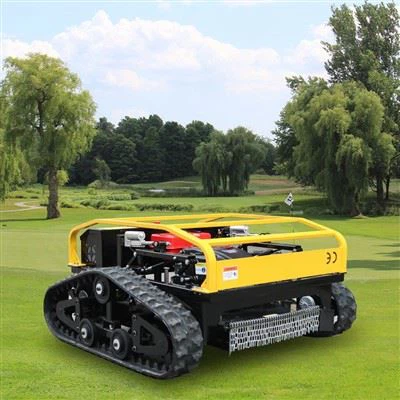
Troubleshooting a remote mower that isn't working can be a frustrating experience, but as a supplier of Remote Mowers, I'm here to guide you through the process step by step. Remote mowers, such as the Remote Control Grass Cutter, Remote Control Lawn Mower With Tracks, and Self Propelled Garden Remote Control Lawn Mower, offer convenience and efficiency in lawn maintenance. However, like any piece of equipment, they can encounter issues from time to time.
Initial Checks
Before diving into more complex troubleshooting, it's essential to perform some basic checks. These simple steps can often identify and resolve common problems quickly.
Power Supply
The first thing to check is the power source of both the mower and the remote control. For battery - powered mowers, ensure that the battery is fully charged. A depleted battery is a common cause of a non - functioning mower. Check the battery connections on the mower to make sure they are clean and secure. Loose or corroded connections can prevent the battery from supplying power effectively.


On the remote control, replace the batteries if they are old or low. Sometimes, a simple battery change can restore functionality. Make sure the battery compartment is clean and free of debris.
Signal Interference
Remote mowers rely on a stable signal between the remote control and the mower. Check for any sources of signal interference in the area. Wireless devices, such as routers, cordless phones, or other radio - frequency emitting devices, can disrupt the signal. Move the mower and the remote control away from these potential sources of interference and try operating the mower again.
Obstructions
Inspect the mower for any physical obstructions. Grass clippings, twigs, or other debris can get caught in the mower's blades, wheels, or other moving parts. Clear any obstructions you find carefully. Be sure to turn off the mower and disconnect the power source before attempting to remove debris to avoid injury.
Remote Control Issues
If the mower doesn't respond to the remote control, there are several things you can do to troubleshoot the problem.
Pairing
Most remote mowers need to be paired with the remote control for proper operation. Check the user manual to see if the mower and the remote control are paired correctly. If not, follow the pairing instructions provided. Sometimes, the pairing can be disrupted, and re - pairing the devices can solve the problem.
Range
Verify that you are within the effective range of the remote control. Different mowers have different operating ranges, which can be affected by factors such as terrain, obstacles, and interference. If you are too far away from the mower, the signal may be too weak to operate the mower. Move closer to the mower and try again.
Function Buttons
Check the function buttons on the remote control. Make sure they are not stuck or damaged. If a button is stuck, gently clean it with a soft, dry cloth. If a button is damaged, it may need to be replaced. Contact our customer support for assistance in obtaining replacement parts.
Mower - Specific Issues
Motor Problems
If the mower's motor isn't running, it could be due to a variety of reasons. First, check the motor's wiring. Look for any loose, frayed, or damaged wires. If you find any issues, repair or replace the wiring as necessary.
Overheating can also cause the motor to shut down. Check if the motor is hot to the touch. If it is, allow the motor to cool down before attempting to operate the mower again. Make sure the mower has proper ventilation to prevent overheating in the future.
Blade Issues
The mower blades are a critical component. If the blades aren't spinning, check for any blockages around the blades. As mentioned earlier, grass clippings or other debris can prevent the blades from turning.
Also, inspect the blades for damage. Dull or damaged blades may not cut effectively or may not spin at all. Sharpen or replace the blades if necessary. Refer to the user manual for instructions on how to safely sharpen or replace the blades.
Drive System
If the mower isn't moving, the drive system may be the culprit. Check the wheels for any signs of damage or wear. Loose or damaged wheels can prevent the mower from moving properly. Tighten any loose wheel nuts or replace damaged wheels.
For tracked mowers, inspect the tracks for damage, such as tears or breaks. Also, make sure the tracks are properly tensioned. A loose or damaged track can cause the mower to lose traction and not move as intended.
Software and Firmware
Some modern remote mowers come with software or firmware that controls their operation. Outdated software or firmware can cause issues with the mower's performance. Check the manufacturer's website for any available software or firmware updates for your mower model.
Follow the instructions provided to download and install the updates. Updating the software or firmware can often fix bugs and improve the mower's functionality.
Professional Assistance
If you've tried all the above troubleshooting steps and the mower still isn't working, it may be time to seek professional assistance. Our team of experienced technicians is available to help diagnose and repair your mower. We have the expertise and tools to handle even the most complex issues.
Contact our customer support for guidance. We can provide you with more in - depth troubleshooting advice or arrange for a technician to service your mower.
Conclusion
Troubleshooting a non - working remote mower can seem daunting, but by following these steps, you can often identify and resolve the problem on your own. Remember to always refer to the user manual for specific instructions related to your mower model.
If you're in the market for a new remote mower or need replacement parts for your existing mower, we're here to help. Our Remote Control Grass Cutter, Remote Control Lawn Mower With Tracks, and Self Propelled Garden Remote Control Lawn Mower are designed for reliability and performance. Contact us today to discuss your needs and explore our range of products. We look forward to working with you to keep your lawn looking its best.
References
- Manufacturer's user manuals for remote mowers
- Industry best practices for lawn mower maintenance and troubleshooting