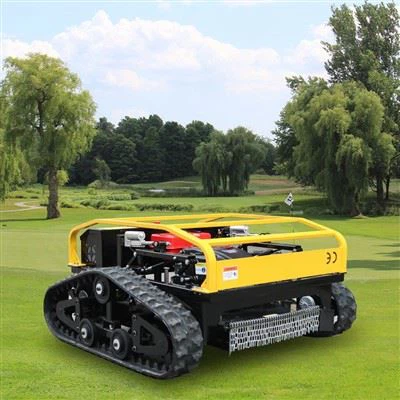
Setting boundaries for a remote mower is crucial for efficient and safe lawn maintenance. As a remote mower supplier, I've seen firsthand how proper boundary - setting can make a huge difference in the performance of these machines. In this blog, I'll share some tips on how to set the boundaries for a remote mower effectively.
Why Boundaries Matter
Before we dive into the how - to, let's understand why setting boundaries is so important. Remote mowers are designed to operate autonomously or semi - autonomously within a defined area. Without proper boundaries, they could wander off into areas you don't want them to, like flower beds, driveways, or even onto the street. This not only risks damaging your property but also poses a safety hazard.
Boundaries also help the mower work more efficiently. By confining it to the lawn area, it can focus on cutting the grass without wasting time on unnecessary movements. This means a better - looking lawn and potentially less wear and tear on the mower.
Types of Boundaries
There are a few different ways to set boundaries for a remote mower.


Physical Boundaries
Physical boundaries are the most straightforward option. You can use edging materials like plastic or metal strips to create a clear separation between the lawn and other areas. These edging materials can be installed along the perimeter of the lawn, and the mower can be programmed or set to recognize them as the limits of its operation.
For example, if you have a flower bed next to your lawn, you can install a plastic edging strip to keep the mower from straying into the flowers. This is a great option for small to medium - sized lawns where the boundaries are relatively simple.
Wire Boundaries
Many remote mowers come with the option to use wire boundaries. A thin wire is buried around the perimeter of the lawn, and the mower is equipped with sensors that detect the magnetic field created by the wire. When the mower approaches the wire, it will turn around and stay within the defined area.
Installing wire boundaries requires a bit more work. You'll need to dig a small trench around the lawn to bury the wire. Make sure the wire is continuous and there are no breaks, as this could cause the mower to lose its sense of boundaries. Wire boundaries are a good choice for larger lawns or those with more complex shapes.
Virtual Boundaries
Some modern remote mowers support virtual boundaries. These are set using a smartphone app or a control panel on the mower itself. You can define the boundaries on a map of your lawn, and the mower will use GPS or other positioning technologies to stay within those limits.
Virtual boundaries are convenient because they don't require any physical installation. However, they rely on a stable GPS signal, so they may not work as well in areas with poor satellite coverage or where there are a lot of obstacles that could interfere with the signal.
Step - by - Step Guide to Setting Boundaries
Let's go through the process of setting boundaries for a remote mower.
Step 1: Plan Your Boundaries
Before you start installing any boundaries, take a good look at your lawn. Identify the areas you want the mower to cover and the areas you want to keep it out of. Consider the shape of your lawn, any obstacles like trees or rocks, and the location of flower beds, driveways, and other non - lawn areas.
Draw a rough map of your lawn and mark the boundaries on it. This will help you visualize the process and make sure you don't miss any important areas.
Step 2: Choose Your Boundary Method
Based on your lawn size, shape, and personal preferences, choose the boundary method that works best for you. If you have a small, simple lawn, physical boundaries may be sufficient. For larger or more complex lawns, wire or virtual boundaries may be a better option.
Step 3: Install the Boundaries
If you're using physical boundaries, install the edging materials along the perimeter of the lawn. Make sure they are firmly in place and create a clear separation.
For wire boundaries, start by digging a small trench around the lawn. The trench should be about 2 - 3 inches deep. Lay the wire in the trench, making sure it forms a continuous loop around the lawn. Connect the ends of the wire to the boundary transmitter, which is usually included with the mower.
If you're using virtual boundaries, open the smartphone app or control panel on the mower. Follow the instructions to define the boundaries on the map of your lawn. You may need to walk around the perimeter of the lawn with your smartphone to get an accurate GPS reading.
Step 4: Test the Boundaries
Once you've installed the boundaries, it's time to test them. Turn on the mower and let it run for a while. Watch to make sure it stays within the defined boundaries. If it crosses the boundaries, check for any installation issues, such as a broken wire or a misaligned physical boundary.
Make any necessary adjustments until the mower is consistently staying within the boundaries.
Tips for Maintaining Boundaries
Setting boundaries is not a one - time task. You'll need to maintain them to ensure they continue to work effectively.
Regular Inspections
Periodically check the physical boundaries to make sure they are still in place and not damaged. For wire boundaries, look for any signs of wear or damage to the wire, such as cuts or breaks. If you notice any issues, repair or replace the boundaries as soon as possible.
Weather Considerations
Weather can affect the performance of your boundaries. Heavy rain or snow can cause physical boundaries to shift or wire boundaries to become buried deeper in the ground. After extreme weather events, check the boundaries and make any necessary adjustments.
Our Remote Mower Products
As a remote mower supplier, we offer a range of high - quality remote mowers to meet your needs. Our Self Propelled Garden Remote Control Lawn Mower is perfect for small to medium - sized lawns. It's easy to operate and comes with adjustable boundaries options.
If you're looking for a more advanced option, our Robotic Lawn Mower is equipped with state - of - the - art technology, including virtual boundary support.
For those who need a powerful and reliable mower for larger lawns, our Remote Control Rotary Lawn Mower Automatic Robot Lawnmower is a great choice. It can handle tough grass and has a long - lasting battery.
Contact Us for Purchase and Consultation
If you're interested in purchasing a remote mower or need more information on setting boundaries, don't hesitate to get in touch. We're here to help you choose the right mower for your lawn and ensure you can set up the boundaries correctly. Whether you're a homeowner with a small backyard or a professional landscaper, we have the products and expertise to meet your needs.
References
- "Lawn Mower Maintenance and Operation Guide", Various Manufacturers
- "Best Practices for Setting Boundaries in Lawn Care", Lawn Care Magazine