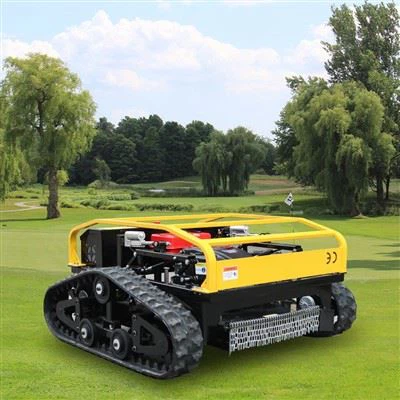
Embarking on the journey of setting up a remote mower for the first time can be both exciting and a bit daunting. As a supplier of high - quality remote mowers, I've witnessed firsthand the transformation that these machines bring to lawn care. In this blog, I'll guide you through the entire process of setting up your remote mower, ensuring that you can make the most of this innovative technology.
Unboxing Your Remote Mower
The first step in setting up your remote mower is unboxing it. Carefully remove the mower from its packaging, taking note of all the components included. You should find the mower itself, the remote control unit, a set of tools (such as wrenches for blade adjustments), and a user manual. The user manual is your best friend at this stage; it contains detailed information about the mower's features, safety instructions, and setup procedures.
Inspect the mower for any visible damage during transit. Look for scratches, dents, or loose parts. If you notice any issues, contact our customer support immediately. We stand behind the quality of our Remote Control Mower, and we'll ensure that you get a replacement or the necessary repairs.
Understanding the Remote Control
The remote control is the heart of your remote mower operation. Take some time to familiarize yourself with its layout. Most remote controls have a joystick or a set of directional buttons for maneuvering the mower, as well as buttons for functions like starting and stopping the blades, adjusting the mowing speed, and activating safety features.
Before you attempt to pair the remote control with the mower, make sure the batteries in both the remote and the mower are fully charged. A low - battery situation can cause connectivity issues and affect the performance of the mower. Refer to the user manual for the correct battery installation and charging procedures.
Pairing the Remote Control with the Mower
Pairing the remote control with the mower is a crucial step. Each mower model may have a slightly different pairing process, but generally, it involves the following steps:
- Turn on the mower by switching the power switch to the "On" position. You may see indicator lights on the mower come on, indicating that it's ready to be paired.
- On the remote control, locate the pairing button. Press and hold this button until the indicator light on the remote starts flashing. This indicates that the remote is in pairing mode.
- On the mower, there is usually a corresponding pairing button. Press this button on the mower within a few seconds of activating the pairing mode on the remote. The indicator lights on both the remote and the mower should stop flashing and stay steady, indicating that they are successfully paired.
If you encounter any problems during the pairing process, don't worry. Our Remote Control Mower comes with comprehensive troubleshooting guides in the user manual. You can also reach out to our technical support team for assistance.
Blade Installation and Adjustment
Once the remote control and the mower are paired, it's time to install and adjust the blades. Most remote mowers come with pre - sharpened blades, but it's still a good idea to inspect them for any damage or dullness.
To install the blades, use the tools provided in the package. Follow the instructions in the user manual carefully, as improper blade installation can lead to uneven cutting and potential safety hazards. After installing the blades, you may need to adjust the cutting height. This can usually be done by turning a knob or using a lever on the mower. The cutting height adjustment allows you to customize the length of the grass you want to cut, depending on your lawn's needs.


Safety Checks
Safety should always be your top priority when setting up and operating a remote mower. Before you start using the mower, conduct a thorough safety check.
- Check the mower's safety features, such as the emergency stop button on the remote control and the mower itself. Make sure these buttons are working properly by testing them.
- Inspect the mower's body for any loose or protruding parts that could cause injury. Tighten any loose screws or bolts.
- Clear the mowing area of any obstacles, such as rocks, toys, or branches. These objects can not only damage the mower but also pose a safety risk if they are thrown by the spinning blades.
First Test Run
After completing all the setup steps and safety checks, it's time for the first test run. Find a small, open area of your lawn to start. Use the remote control to slowly maneuver the mower forward, backward, and turn it in different directions. Pay attention to how the mower responds to the commands on the remote.
If the mower doesn't move as expected or if you notice any strange noises or vibrations, stop the mower immediately. Refer to the troubleshooting section of the user manual or contact our technical support team. It's better to address any issues early on to avoid more serious problems later.
Maintenance Tips
To ensure the long - term performance of your remote mower, regular maintenance is essential.
- After each use, clean the mower thoroughly. Remove any grass clippings, dirt, or debris from the blades, the underside of the mower, and the wheels. This helps prevent corrosion and keeps the mower running smoothly.
- Check the blade sharpness regularly. Dull blades can result in uneven cutting and put more strain on the mower's motor. Sharpen or replace the blades as needed.
- Inspect the batteries regularly. Make sure they are properly charged and stored in a cool, dry place when not in use.
Why Choose Our Remote Mowers
Our Remote Grass Mower is designed with the latest technology and high - quality materials. We offer a wide range of models to suit different lawn sizes and requirements. Our mowers are known for their reliability, ease of use, and excellent cutting performance.
Whether you're a professional landscaper or a homeowner looking for an efficient way to maintain your lawn, our remote mowers are the perfect choice. We also provide top - notch customer support, including technical assistance, parts replacement, and maintenance advice.
Contact Us for Purchase and Consultation
If you're interested in purchasing a remote mower or have any questions about the setup process, we'd love to hear from you. Our team of experts is ready to assist you in finding the right mower for your needs and guiding you through the entire purchasing process. Don't hesitate to reach out to us for more information.
References
- User manuals of our remote mowers
- Industry standards and best practices for lawn mower setup and maintenance