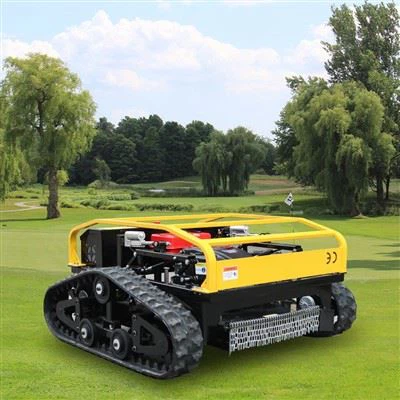
In the modern era of smart technology, the integration of remote mowers with mobile apps has revolutionized the lawn - care industry. As a remote mower supplier, I understand the importance of providing users with a seamless and efficient way to connect their mowers to mobile applications. This not only enhances the user experience but also adds a new level of convenience and control. In this blog, I will guide you through the process of connecting a remote mower to a mobile app.
Understanding the Basics of Remote Mowers and Mobile App Connectivity
Before delving into the connection process, it's essential to understand the fundamental components involved. Remote mowers, such as the Remote Control Lawn Mower With Tracks, Remote Grass Mower, and Robotic Lawn Mower, are equipped with advanced technology that allows them to communicate with mobile devices. These mowers typically have built - in Wi - Fi or Bluetooth modules, which serve as the communication channels between the mower and the mobile app.
The mobile app, on the other hand, is a software interface that enables users to control and monitor the mower remotely. It provides features such as starting and stopping the mower, adjusting the cutting height, setting mowing schedules, and receiving real - time status updates.
Prerequisites for Connecting a Remote Mower to a Mobile App
1. Compatibility
First and foremost, ensure that your remote mower is compatible with the mobile app. Most manufacturers provide a list of supported mower models on their official websites. Check the specifications of your mower and the app to confirm compatibility.


2. Mobile Device Requirements
The mobile device (smartphone or tablet) you use must meet the minimum requirements of the app. This includes having the appropriate operating system (e.g., iOS or Android) and sufficient storage space to install the app.
3. Network Connection
For Wi - Fi - enabled mowers, you need a stable Wi - Fi network in the area where the mower will operate. Bluetooth - enabled mowers require the mobile device to have Bluetooth functionality enabled and be within the effective range of the mower.
Step - by - Step Guide to Connecting a Remote Mower to a Mobile App
Step 1: Install the Mobile App
The first step is to download and install the official mobile app for your remote mower from the App Store (for iOS devices) or the Google Play Store (for Android devices). Search for the app using the name of your mower's manufacturer or the specific app name provided in the mower's user manual.
Step 2: Power On the Remote Mower
Turn on the remote mower and ensure that it is in a ready - to - connect state. This may involve pressing a specific button on the mower or waiting for the mower to complete its startup sequence.
Step 3: Enable Network or Bluetooth on the Mobile Device
If your mower uses Wi - Fi, connect your mobile device to the same Wi - Fi network as the mower. If it uses Bluetooth, turn on the Bluetooth function on your mobile device.
Step 4: Pair the Mower with the Mobile App
Open the installed mobile app on your device. Look for the option to add a new device or connect a mower. The app will start searching for available mowers in the vicinity.
- Wi - Fi Connection: If using Wi - Fi, the app may prompt you to enter the Wi - Fi network credentials (SSID and password) that the mower should connect to. Follow the on - screen instructions to complete the connection.
- Bluetooth Connection: For Bluetooth, select the mower from the list of available devices in the app. The app will then establish a pairing between the mobile device and the mower.
Step 5: Complete the Setup Process
Once the mower is successfully paired with the app, you may need to complete additional setup steps. This can include registering the mower with your account, entering the mower's serial number, and setting up initial preferences such as the mowing area and cutting height.
Troubleshooting Common Connection Issues
1. No Device Found
- Check Power and Range: Ensure that the mower is powered on and within the effective range of the Wi - Fi or Bluetooth signal.
- Restart Devices: Try restarting both the mower and the mobile device. Sometimes, a simple restart can resolve connection issues.
- Update Firmware: Check if there are any firmware updates available for the mower and the mobile app. Outdated firmware can cause connectivity problems.
2. Connection Drops
- Network Stability: If using Wi - Fi, check the stability of the Wi - Fi network. A weak or unstable network can lead to connection drops. You may need to move the mower closer to the Wi - Fi router or improve the network signal strength.
- Interference: Bluetooth connections can be affected by interference from other electronic devices. Try moving away from sources of interference, such as microwaves or other Bluetooth devices.
Benefits of Connecting a Remote Mower to a Mobile App
1. Convenience
With a mobile app, you can control your mower from anywhere, at any time. Whether you're at work, on vacation, or simply relaxing indoors, you can start, stop, or schedule mowing sessions with just a few taps on your phone.
2. Customization
The app allows you to customize the mowing settings according to your specific needs. You can adjust the cutting height, set different mowing patterns, and define the mowing area precisely.
3. Monitoring and Maintenance
Real - time status updates provided by the app help you keep track of the mower's battery level, cutting performance, and any potential issues. This enables you to perform timely maintenance and avoid unexpected breakdowns.
Why Choose Our Remote Mowers for Mobile App Connectivity
As a remote mower supplier, we take pride in offering high - quality mowers that are designed for seamless integration with mobile apps. Our mowers are equipped with the latest technology, ensuring reliable and stable connectivity.
- Advanced Communication Modules: Our mowers feature state - of - the - art Wi - Fi and Bluetooth modules, which provide fast and secure communication between the mower and the mobile app.
- User - Friendly App Interface: The mobile app we provide is intuitive and easy to use, even for first - time users. It offers a wide range of features that enhance the overall lawn - care experience.
- Continuous Support and Updates: We are committed to providing our customers with continuous support and regular app updates. This ensures that your mower always has access to the latest features and improvements.
Contact Us for Purchasing and Further Consultation
If you're interested in purchasing a remote mower that can be easily connected to a mobile app, we'd love to hear from you. Our team of experts is ready to assist you in choosing the right mower for your needs and guiding you through the connection process. Whether you have questions about the features, compatibility, or any other aspect of our remote mowers, feel free to reach out to us.
References
- Manufacturer's user manuals for remote mowers
- Technical documentation of mobile apps for remote mowers
- Online resources on smart home and lawn - care technology