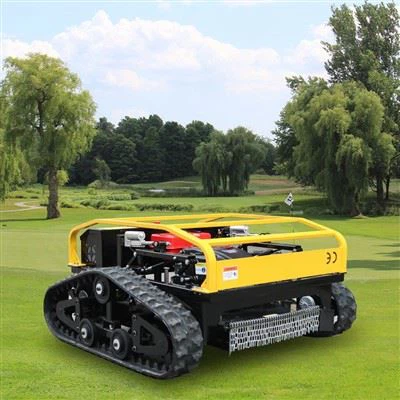
As a supplier of remote mowers, I understand the frustration that comes with a non - functioning remote mower. A malfunctioning mower can disrupt your lawn - care routine and lead to an unkempt yard. In this blog post, I'll guide you through the process of troubleshooting a remote mower that doesn't work, helping you get your lawn back in shape.
1. Initial Checks
Before diving into complex troubleshooting, start with some basic checks. These simple steps can often identify and resolve the issue quickly.
Power Supply
The first thing to examine is the power source. If your Remote Grass Mower is battery - powered, check the battery's charge level. A depleted battery is a common cause of a non - functioning mower. Remove the battery and use a battery charger to check if it can hold a charge. If the battery fails to charge, it might need to be replaced.
For mowers that run on gasoline, check the fuel level. Sometimes, a low fuel level can cause the mower to stop working. Ensure that the fuel is fresh, as old gasoline can lead to engine problems. Also, inspect the fuel line for any signs of damage or blockage.
Remote Control
The remote control is an essential part of a remote mower. Check if the batteries in the remote are fresh. Replace them if necessary. Make sure there are no physical damages to the remote, such as cracked buttons or a broken casing.
Try to establish a connection between the remote and the mower. Some mowers have a pairing process. Refer to the user manual to ensure that the remote and the mower are properly paired. If the pairing fails, there might be an issue with the mower's receiver or the remote's transmitter.
2. Inspecting the Mower's Components
If the initial checks don't solve the problem, it's time to look at the mower's internal components.
Blades
The blades are the cutting part of the mower. Dull or damaged blades can prevent the mower from cutting grass effectively. Inspect the blades for any signs of wear, such as nicks or bends. If the blades are dull, you can sharpen them using a blade sharpener. However, if they are severely damaged, it's best to replace them.
Make sure the blades are properly attached to the mower. Loose blades can cause vibrations and prevent the mower from working correctly. Tighten the blade bolts if they are loose.
Motor
The motor is the heart of the mower. Check if the motor is getting power. You can use a multimeter to test the voltage at the motor terminals. If there is no power, there might be an issue with the wiring or the motor controller.
Inspect the motor for any signs of overheating or burning. A burnt - smelling motor indicates a serious problem. In such cases, it's advisable to contact a professional technician to repair or replace the motor.
Wheels and Tracks
For Remote Control Mower models with wheels or tracks, check their condition. Worn - out wheels or tracks can prevent the mower from moving properly. Look for any signs of damage, such as cracks or flat spots.


Make sure the wheels are properly aligned and the tracks are properly tensioned. Misaligned wheels or loose tracks can cause the mower to veer off course or stop moving altogether.
3. Software and Firmware Issues
In today's technological age, many remote mowers come with software and firmware. These can sometimes cause problems if they are outdated or corrupted.
Software Updates
Check if there are any available software updates for your mower. Manufacturers often release updates to fix bugs, improve performance, and add new features. Visit the manufacturer's website and download the latest software version for your mower model.
Follow the instructions in the user manual to install the software update. Make sure the mower is connected to a stable power source during the update process to avoid any issues.
Firmware Reset
If the software update doesn't solve the problem, you can try resetting the mower's firmware. This will restore the mower to its factory settings. However, be aware that this will erase any custom settings you have made.
Refer to the user manual for the specific steps to reset the firmware. Usually, it involves pressing a combination of buttons on the mower or using the remote control to initiate the reset process.
4. Environmental Factors
Sometimes, environmental factors can affect the performance of a remote mower.
Terrain
If the mower is having trouble moving on a particular terrain, it might be because the terrain is too rough or steep. Remote mowers are designed to work on certain types of terrain. If the terrain is beyond the mower's capabilities, it can cause the mower to get stuck or stop working.
Try to mow on a more suitable terrain. If possible, level the ground or remove any obstacles that might be causing problems.
Weather Conditions
Extreme weather conditions can also impact the mower's performance. High humidity, heavy rain, or extreme heat can cause electrical problems or damage the mower's components.
Avoid using the mower in adverse weather conditions. If the mower has been exposed to water, dry it thoroughly before using it again.
5. Professional Help
If you have tried all the above troubleshooting steps and the mower still doesn't work, it's time to seek professional help.
Contact the manufacturer's customer support. They have the expertise and resources to diagnose and fix complex problems. Provide them with detailed information about the issue, including the symptoms, the steps you have taken to troubleshoot, and the model and serial number of the mower.
You can also take the mower to a professional repair shop. Make sure the repair shop has experience working with remote mowers. They can use specialized tools and equipment to diagnose and repair the problem.
Conclusion
Troubleshooting a remote mower that doesn't work can be a challenging task, but by following these steps, you can often identify and resolve the issue. Remember to start with the basic checks, move on to inspecting the components, and consider software and environmental factors. If all else fails, don't hesitate to seek professional help.
If you are in the market for a new Robotic Lawn Mower or need replacement parts for your existing mower, we are here to help. As a leading supplier of remote mowers, we offer a wide range of high - quality products and excellent customer service. Contact us to discuss your requirements and start a procurement negotiation.
References
- Manufacturer's User Manuals
- Industry Publications on Lawn Mower Maintenance and Troubleshooting